
Download GenTube – Fast AI Art Generator, Free & Secure
Overview
GenTube is a cloud‑based AI art creation platform that promises to turn a simple textual prompt into a polished visual masterpiece in roughly two seconds. The service is built for a broad audience ranging from professional designers who need rapid concept sketches to hobbyists who enjoy experimenting with new aesthetics. By removing the need for heavyweight desktop applications, GenTube eliminates the typical barriers of steep learning curves, expensive licenses, and hardware constraints.
All you need is a modern web browser and an internet connection, and the platform instantly grants access to an ever‑growing library of artistic styles, ranging from neon‑lit cyberpunk cityscapes and dreamy fantasy illustrations to minimalist abstract textures and detailed architectural renderings. The core engine behind GenTube leverages state‑of‑the‑art diffusion models that have been trained on millions of high‑resolution images, ensuring that the output is both sharp and color‑balanced. Users can generate an unlimited number of images without encountering hidden quotas, making it an ideal solution for rapid iteration during brainstorming sessions, mood‑board creation, or even generating assets for presentations and social media.
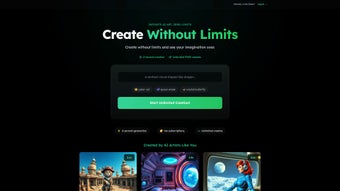
The integrated community gallery showcases a diverse array of user‑generated creations, providing endless inspiration and demonstrating the platform’s versatility across different creative domains. Whether you need a quick visual hook for a marketing pitch, a prototype asset for a game, or a striking illustration for a blog post, GenTube delivers high‑quality results with minimal effort and no upfront cost.
Key Features & Capabilities
- Instant Generation: Produce a complete artwork in approximately two seconds, dramatically reducing turnaround time for design projects.
- Unlimited Creations: No caps on the number of images you can generate, allowing endless experimentation.
- Broad Style Library: Access themes such as futuristic, whimsical, abstract, architectural, and character‑driven aesthetics.
- Web‑Based Platform: No downloads or installations required; works directly in modern browsers.
- Simple Authentication: A single login (email or social account) grants immediate access to all features.
- Community Gallery: Browse, like, and remix artwork created by other users for inspiration.
- High‑Resolution Export: Download generated images in multiple resolutions suitable for print or digital use.
- Secure Cloud Processing: All AI computations run on encrypted servers, ensuring privacy of your prompts and designs.
- Responsive Design: Optimized for desktop, tablet, and mobile browsers, giving you flexibility wherever you work.
- Regular Updates: The development team rolls out new style packs and performance improvements on a weekly basis.
These capabilities combine to make GenTube a truly universal tool. Because the heavy lifting occurs on remote servers, the performance you experience is largely independent of your local hardware, which means you can generate high‑quality assets even on modest laptops or tablets. The platform’s style engine supports layered prompts, allowing you to blend multiple concepts (for example, “steampunk robot in a pastel sunset”) and achieve nuanced results that would normally require manual compositing. Additionally, GenTube offers a batch‑generation mode for power users: you can submit a CSV file with dozens of prompts and receive a zip archive of all rendered images, streamlining workflows for content teams that need large volumes of visual material. The combination of speed, scalability, and an ever‑expanding style catalog positions GenTube as a competitive alternative to traditional desktop suites such as Photoshop or Illustrator, especially for rapid‑iteration scenarios where time is the most valuable resource.
Installation, Usage & Compatibility
Getting Started – No Installation Required
Since GenTube is entirely web‑based, the traditional installation steps are replaced by a straightforward sign‑up process. Visit the official GenTube website, click the “Sign Up” button, and choose either an email registration or a social login (Google, Facebook, or Apple). After confirming your email (if applicable), you’ll land on the main dashboard where the AI prompt field awaits your creative input. The onboarding wizard walks you through selecting a default style and configuring basic account preferences, such as language and notification settings, so you can start creating within minutes.
Creating Your First Artwork
1. Enter a Prompt: Type a descriptive phrase such as “futuristic neon city at dusk” or “playful cartoon dragon in a meadow.” The more specific you are, the better the AI can match your vision.
2. Select a Style: Choose from the dropdown menu (e.g., “Whimsical,” “Abstract,” “Architectural”).
Each style applies a unique set of filters and composition rules.
3. Generate: Hit the “Create” button. Within two seconds, a high‑resolution image appears in the preview pane.
4.
Refine or Save: If the result isn’t perfect, tweak the prompt or style and regenerate. Once satisfied, click “Download” to save the image in PNG or JPEG formats.
5. Share or Archive: Use the built‑in “Share” button to post your creation directly to the community gallery, social media, or a private project folder for future reference.
Supported Operating Systems
GenTube runs on any device with a modern web browser, including Windows 10/11, macOS Ventura and later, Linux distributions, Chrome OS, Android 8.0+, and iOS 13+. Because the heavy lifting occurs on remote servers, the client only needs to support HTML5, CSS3, and JavaScript—features present in browsers such as Chrome, Firefox, Edge, Safari, and Brave.
Performance Tips & Best Practices
For the smoothest experience, ensure a stable internet connection (minimum 5 Mbps recommended). Clear your browser cache periodically to avoid outdated script files, and consider using an ad‑blocker only on non‑essential sites to keep bandwidth available for the AI rendering process. If you encounter latency, switching to a wired Ethernet connection or a higher‑speed Wi‑Fi band often resolves the issue. Power users who generate large batches should enable “Low‑Resolution Preview” in the settings to reduce data transfer during the initial generation phase, then request the final high‑resolution export once the composition is approved.
Pros, Cons & Frequently Asked Questions
Pros
- Lightning‑fast image generation (≈2 seconds).
- Unlimited free creations—no hidden quotas.
- Broad style selection suitable for diverse projects.
- Fully web‑based; works on any modern OS or device.
- Secure cloud processing protects user data.
- Active community gallery for inspiration.
- Batch‑generation mode for high‑volume workflows.
- Regular style‑pack updates keep the library fresh.
Cons
- Requires an internet connection; offline use not possible.
- Advanced fine‑tuning (e.g., precise brush control) is limited compared to desktop raster editors.
- Some niche artistic styles may not be available out‑of‑the‑box.
- Export resolution is capped at 4K for free accounts; higher resolutions need a paid tier.
- Batch‑generation may incur longer queue times during peak usage.
FAQ
Is GenTube completely free?
GenTube offers a robust free tier that includes unlimited image generation and access to the core style library. A premium subscription unlocks higher‑resolution exports, priority rendering queues, and exclusive style packs.
Can I use the images for commercial projects?
Yes. All images created on GenTube under the free tier are covered by a royalty‑free commercial license, provided you comply with the platform’s terms of service. Premium users receive an extended commercial use agreement.
How does GenTube protect my privacy?
All prompts and generated images are processed on encrypted servers. The platform does not store prompt data beyond the session unless you explicitly save the image to your personal gallery.
What browsers are recommended for optimal performance?
Google Chrome, Mozilla Firefox, Microsoft Edge, and Apple Safari (latest versions) deliver the best experience. Ensure JavaScript is enabled and hardware acceleration is turned on.
Can I integrate GenTube with other design tools?
While GenTube itself is a standalone web app, you can export images and import them into Photoshop, Illustrator, Figma, or any other design suite for further refinement.
Is there a mobile app for GenTube?
GenTube does not currently offer a native mobile app, but the responsive web interface works flawlessly on smartphones and tablets, providing the same feature set as the desktop version.
Pros: Instant generation, unlimited free usage, web‑based accessibility, strong community gallery, batch mode.
Cons: Requires internet, limited fine‑tuning, free resolution cap, occasional queue delays.
Conclusion & Call to Action
GenTube stands out in the crowded AI‑art market by delivering speed, flexibility, and a genuinely unlimited creation model without imposing steep fees. Its browser‑first architecture means you can jump from a Windows workstation to an iPad without missing a beat, and the extensive style catalog caters to a wide spectrum of creative needs—from corporate branding to indie game concept art. While the lack of offline capability and some advanced editing tools may deter power users who need pixel‑perfect control, the platform’s ease of use and rapid output make it an indispensable sidekick for brainstorming sessions, client pitches, and personal projects alike.
Ready to transform your ideas into visual reality in seconds? Download GenTube now, sign up for free, and start generating limitless AI art today. Whether you’re a professional designer looking to accelerate concept work or a hobbyist eager to explore new aesthetics, GenTube offers a secure, fast, and inspiring environment to unleash your imagination.



.png)



